-
-
Useful XNA Resources
18th February, 2015 by ckx

Dump of useful resources/articles/whatever for XNA development.
- Posted in:
-
pscx2 guide
16th November, 2012 by ckxComment (1)
- Posted in:
-
General PSP recording information
26th March, 2012 by ckx
Relevant info
My PSP captures are generally Recorded with RemoteJoyLite v.19 + Fraps 3.4.7, encoded in 10bit x264 (CRF 22, colorprim/colormatrix/transfer = smpte170m, FFMS, SmoothLevels pc2tv) and audio is 320kbps AAC.
Youtube has audio problems on 360p or lower videos (which PSP videos are), it normalizes and fucks with the quality / lowers the volume. Common fix is to up the dB but I don’t want to since that distorts the sound a bit. Turn up system volume or use a plugin to download the videos (MP4 is best quality). Downloading file gives you proper, original audio.
How2do
- Posted in:
-
Pokemon White no$gba setup tips
27th September, 2011 by ckx
Setting up no$gba so I could begin my Pokemon adventure was actually a bit of a hassle. My requirements were; fraps-able, pokesav-able, no AP/etc, and no major graphical glitches. I also had an intent to switch between an emulator and my DS often… but with the various save converters on the net, that’s easy.
Anyways, to save myself trouble in the future, I mirrored/slightly tweaked a no$gba package that I found on gbatemp. Slightly tweaked means I changed some of the ini settings; the package I originally found had a few undesirable values. Like, if you can’t get Pokesav to open up your no$gba save files, it’s probably because they’re compressed. In NO$GBA.INI, set:
SAV/SNA File Format == Raw
By the way, before messing with no$gba.ini, I’d recommend deleting the file, opening no$gba, setting some random option that you want set, and saving to generate a new INI.
That package comes with no$zoomer which is cool, it does a lot of things to make no$gba better, and also allows for openGL/directx rendering, so fraps just works. But, fraps was hooking itself onto the bottom screen of no$zoomer, and wouldn’t let go; I couldn’t cap from the top screen at all. The fix for this was pretty simple, there’s a setting under “View” for “Separate Window”, which detaches the top/bottom DS screens from each other. Then, fraps will just hook onto whichever you have in focus. I don’t particularly care about capping from the bottom screen, maybe in another game, but for Pokemon it’s actually saving me the trouble of cropping images/video with imagemagick/avisynth scripts, so I was pretty happy.
Next up is this issue:
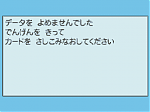
「データを よめませんでした
でんげんを きって
カードを さしこみなおしてください」Can’t read the data.
Please cut the power, and insert a card(cart).
Well, for these kinds of errors, Google-sensei widely tells you to change the “NDS-Cartridge Backup Media” no$gba option, until you find one that works for your game (which btw, will normally be FLASH 512KBytes). Except that didn’t do anything for my Pokemon White ROM, so I had to search a bit. I found a 2channel thread that posted some AR code which fixed everything:
Action Replay DS Cheat, enter RAW
52004EA0 E8BD01F0
02001800 E92D4008
02001804 E3A00000
02001808 E3A0150E
0200180C E2811A06
02001810 E5810B44
02001814 EA5FE9F2
02001818 E59F4034
0200181C E59F5034
02001820 E5845000
02001824 E59F4020
02001828 E5945000
0200182C E59F601C
02001830 E1550006
02001834 03A05001
02001838 05C4500A
0200183C 03A05000
02001840 E1445DB4
02001844 E8BD01F0
02001848 EA000D95
0200184C 02180C80
02001850 28AAFF1F
02001854 037FBFE0
02001858 EAA01606
02004EA0 EAFFF25C
D0000000 00000000
With this activated, the game seems to boot, save, and load just fine.
By the way, this code is for (J) version of the game. Specifically, the ROM I’m using is “5215 – Pokemon – White (DSi Enhanced) (J).nds”.
I don’t really know/care about other versions of the game, so I’ll just post that one. Alongside it was a code for “curing shadows” (it disables 3D edge marking);Action Replay DS Cheat, enter RAW
521892A8 43082020
221892A8 00000010
D2000000 00000000
Cool.
Sound was actually a bit of an issue; I was getting madness annoying slight static background-noise. This ended up being because “options -> volume” was set to like 20%; if you set it to 100% (and turn down no$gba’s volume in mixer a bit), it sounds fine. I never got Save States to work, but I don’t really care about those.
- Posted in:
-